

Get the Most Out of Your PC with the Full Version of System Mechanic
The chart below compares the full version of System Mechanic® with the free products System Checkup™ and System Mechanic® Free. To fully unlock all of the key PC performance features found only in the award-winning optimization software System Mechanic, upgrade now to the full version of System Mechanic.
System Mechanic Special Offer
Smart recommendations deliver personalized tips to keep your PC optimized and protected. Speed up, secure, and simplify your digital life with System Mechanic©.
Free Download Now Faster processor & internet speed
8x PC Mag winner
Faster processor & internet speed
8x PC Mag winner

display: table-cell;
vertical-align: middle;
}
.product-chart .column-one {width: 24%;}
.product-chart .column-two {width:25%;}
.product-chart .column-three {width:25%;}
.product-chart .column-four {width:25%;}
.product-chart .column-one, .product-chart .column-two, .product-chart .column-three, .product-chart .column-four {
border: 0px;
}
.product-chart .header {
background-color: #737373 !important;
color: #ffffff !important;
font-weight: bold !important;
}
.product-chart .row .cell:first-child {
text-align: left;
}
.product-chart .header-row {
width: 100%;
}
/*best value tag*/
.product-chart .best-value {
width: 100%;
padding: 10px 0px;
position: absolute;
top: 0px; left: -1px;
color: #49620B;
text-align: center;
font-weight: bold;
background-color: #fcfd97;
border: 1px solid #bfca15;
}
.product-chart .product-image img {
}
/*Product price*/
.product-chart .product-price {
font-size: 16px;
font-weight: bold;
color: #bc2222;
margin-top: 0px;
padding-bottom: 10px;
}
.product-chart .product-price span {
font-size: 12px;
color: #878787;
}
/*CTA Button*/
.product-chart .button-cell {padding-top: 0px;}
.product-chart .product-image {
padding-bottom: 0px;
}
.product-chart .product-name {
font-size: 14px;
font-weight: bold;
line-height: 20px;
text-align: center;
}
/*Target right most border*/
.product-chart .cell:last-child, .product-chart .table-header:last-child {
/*border-right: 1px solid steelblue;*/
}
/*target every other odd row*/
.product-chart .row:nth-child(odd) {
background-color: #f9f9f9;
}
.product-chart .row-white {
background-color: #ffffff !important;
}
.product-chart .feature-check {
text-align: center;
vertical-align: middle;
line-height: 100%;
font-size: 30px;
color: #54BD54;
}
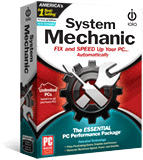
System Mechanic
Only $29.95/year
System Mechanic Pro
Only $49.95/year
iolo Premium Service +
System Mechanic Pro
Only $199.95/year
Feature
Comparison
System Checkup™
System Mechanic® Free
System Mechanic® Full Version
Analyze
System Analysis – comprehensively scans your entire system for causes of slowdown and threats to stability, then displays details about your PC’s condition
●
●
●
Clean
ActiveCare® – automatic cleaning and repair whenever your PC is idle
◌
◌
●
Tune-up Definitions™ – database of over 30,000 Windows programs and processes to classify and fix new causes of slowdown
◌
◌
●
All-in-one PC Cleanup – cleans junk files, registry issues and private data with one convenient wizard
◌
◌
●
Internet Cleanup – removes internet junk files, private browsing and search data, cookies and more
◌
●
●
Windows Cleanup – removes Windows junk files, broken shortcuts and more
◌
●
●
Registry Cleanup – Cleans out and repairs registry problems
◌
●
●
Advanced Uninstaller – completely uninstalls hard to remove programs and botched or damaged installations
◌
◌
●
Speed Up
LiveBoost™ – real-time RAM, HDD and CPU optimization
◌
◌
●
RAMjet™ – reclaims wasted RAM in real time
◌
◌
●
AcceleWrite™ – optimizes file writes for faster HDD performance
◌
◌
●
OptiCore™ – dynamically adjusts system resources to prioritize in-use applications
◌
◌
●
NetBooster™ – increases internet speed by fine-tuning over a dozen hidden TCP/IP settings
◌
◌
●
Disk Defragmenter – defragments data files on all volumes of the PC
◌
●
●
Program Accelerator® – proprietary program data re-alignment technology accelerates file access and program launches
◌
◌
●
Memory Mechanic® – reclaims trapped memory from apps that no longer need it
◌
◌
●
Startup Optimizer™ – prevents system-taxing bloatware from launching at startup
◌
◌
●
Protect
Security Optimizer™ – finds and patches Windows security vulnerabilities
◌
◌
●
Privacy Shield™ – disables personal data, wi-fi and broadband sharing
◌
◌
●
Incinerator® – permanently erases all traces of deleted-file data to protect your privacy
◌
◌
●
Recover
System Troubleshooter™ – helps find solutions to common computer problems
◌
◌
●
System Restore – allows user to undo recent system changes
◌
◌
●
Manage
Super Control Panel – easy access to advanced Windows settings
◌
◌
●
Bonus Features
Help Files access – comprehensive product features database with tutorials on getting the most out of System Mechanic
◌
●
●
Whole Home License® – install it on every PC in your home
◌
◌
●
Free product upgrade service – automatically receive frequent updates and major version releases as they become available
◌
◌
●
Free 24/7 technical support – experienced iolo Customer Care team answers your questions by phone or email
◌
◌
●
Features listed in the Full Version column are included in System Mechanic 16.5. Copyright 1998-2017 iolo technologies, LLC. All rights reserved.
