


Data Recovery Software
You could understandably be annoyed or heartbroken if you accidentally delete a crucial digital file — whether from a hard drive, camera, or form of removable media. However, for owners of Windows PCs, we at iolo offer a data recovery solution we call Search and Recover.
Get It Now!(Available for Windows® 11, 10, 8.1, 8, and 7)
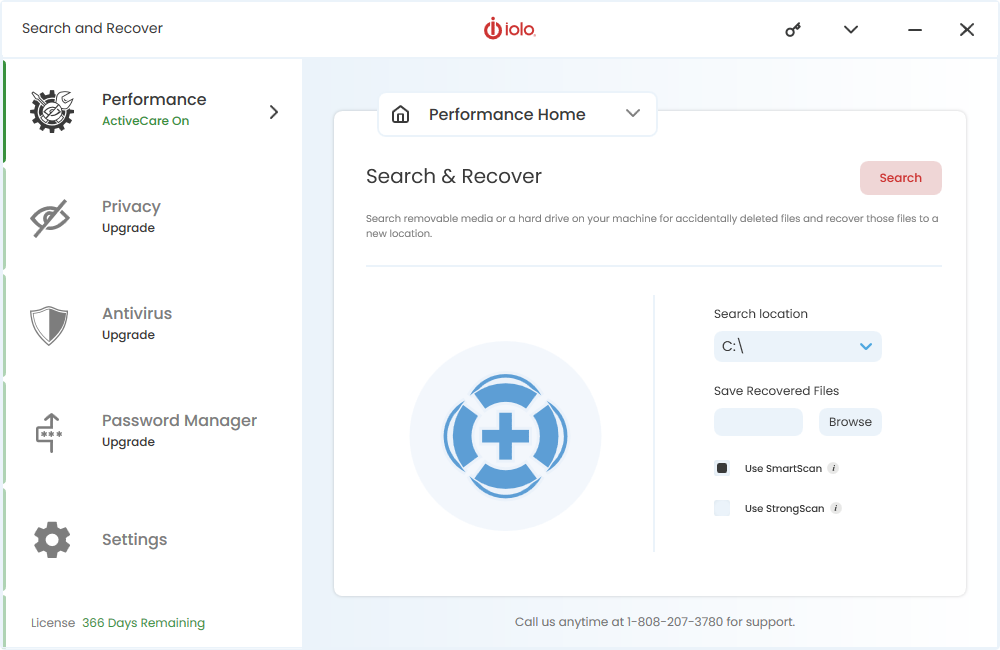
The various types of files this software can assist you in recovering include:
- Text documents
- Photos
- Music
- Emails
You may already be able to see, then, how Search and Recover could potentially play a big part in easing your data retrieval efforts.
Learn More
Perhaps the file you lost was important to you for sentimental reasons; think, for example, a photo of you with a since-departed loved one. Alternatively, the file you want back could be vital to your work life. It can be too easy to accidentally delete a file — due to such causes as:
- Absentmindedly clicking the wrong button
- An app crashing
- A document editor failing to save the file properly
- Inadvertently unleashing a virus that goes on to wipe out the file
Continue reading to learn more about our data recovery software and how it can be effectively leveraged for restoring a wide range of files you might have thought gone forever.
iolo’s Data Recovery Software
After purchasing Search and Recovery, you can use this data recovery software on all of your home PCs running any of the following Windows versions:
- Windows 11
- Windows 10
- Windows 8.1
- Windows 8
- Windows 7
- Windows Vista
- Windows XP Service Pack 3 (SP3)
It certainly isn’t just Windows PCs from which you will be able to retrieve data with Search and Recover’s help. The software can scan all of the following for missing data:
- Hard drives
- Flash drives
- Memory cards
- Cameras
- CDs
- DVDs
- MP3 players
It can even fetch data from malfunctioning or damaged devices. That’s no small boon when you consider the potential added complication of these devices carrying corrupted, not just deleted, files — but Search and Recover can even assist you in restoring damaged files to their former condition.
Key Features and Benefits
We pride ourselves on enabling customers to utilize one-click restoration of lost or damaged files. In fact, this simplicity of use belies the clever, complex clockwork that happens under the hood. Here are some noteworthy examples of the software’s rich functionality:
-
Email recovery
The popular email programs from which Search and Recover can source mail on your behalf include Outlook, Outlook Express, Netscape Mail and Thunderbird.
-
Hard drive data recovery
Search and Recover can prove a formidable tool in this respect, given the software’s support for drive types including USB, USB 2.0, IDE and FireWire.
-
Flexible searching
You can have the software search in just a select few locations, like specific folders and removable media, or across the entire system.
-
SmartScan
This works by disregarding irrelevant and useless junk files when the software is searching — resulting in a more targeted, streamlined and efficient scanning procedure.
-
StrongScan
By engaging in a sector-level search, StrongScan can scour areas that might not always garner enough attention from data recovery tools other brands have to offer.
We have also thrown in a 30-day money-back guarantee that allows you to essentially sample Search and Recovery and, if you are not satisfied with it, get a refund.
How iolo’s Data Recovery Software Works
Of course, if you personally delete a file on a Windows PC by accident, your first thought could be to head to the Recycle Bin on the desktop. Now, what if you don’t find the file there, or you had already emptied the Recycle Bin — perhaps absentmindedly — after deleting the file?
Does all of this strictly mean that any subsequent attempts to get the file back are ultimately a lost cause? Not necessarily. That’s because often, when a file supposedly gets deleted, it is actually just being hidden away — at least for the time being.
It’s only the pointers to this file that will have gone at first. Still, adding new data to the storage space would risk the above-mentioned file eventually being removed for good.
It isn’t always guaranteed, then, that you will indeed be able to unearth a file previously deleted on your Windows PC. In many instances, however, you can trust iolo’s Search and Recover with giving you what could be the edge you needed for making a breakthrough in a search even for files deleted years earlier.
Trusted Data Retrieval Services by iolo
Many media outlets have praised multifaceted software solutions available from iolo. Our PC optimization product System Mechanic is one of these products that have garnered a warm reception — and Search and Recover has been similarly lauded. Quoted below are just examples of positive comments that have been made about this data recovery software.
“iolo Search and Recover is a very useful program that you will not regret buying. It’s very effective and easy to use.”
“A well-regarded data recovery solution, iolo Search and Recover does the job that is expected of it.”
Why Choose iolo
You might have heard of data recovery services where computer technicians would get in touch with you and arrange to undertake much of the heavy-duty work required to get your data fully restored.
You could, though, find it more convenient — in terms of both effort and time — to install and use data recovery software from iolo before you even contemplate seeking a human‘s direct help in your plight to recover deleted or damaged data.
There are certainly good reasons for you to have faith in our own team’s pedigree, as we:
Offer a broad range of PC optimization tools




Have attracted widespread praise from the press and customers alike





Have more than 20 years’ experience of PC performance innovation
Customer Testimonials
Many of our customers have had positive comments to make about iolo’s Search and Recover. To go some way towards illustrating this point, we have strung together a number of compliments from customer reviews posted to the G2 website:
FAQs
Do you still have questions about iolo’s Search and Recover, or perhaps even about data recovery in general? The information you are looking for could be just below.
What is the pricing structure for Search and Recover?
The way this structure works is that the price listed on the product page is for an initial purchase of Search and Recover. This will enable you to use the software for a year — but, after that period, you will be required to pay a further fee in order to continue with this usage. More details about this pricing system can be found on our website’s Sales Policy page.
Can a single subscription to Search and Recover only be used on one PC?
Not at all. This subscription will allow you to use the data recovery software on as many PCs as you like at your home.
How long will a deleted file remain on my drive?
There is no one specific answer to this question, as a deleted file will basically just stay on the drive until the space taken up by that file is used for storing new data. Once that happens, the deleted file will truly be gone for good. If you have only recently deleted a file from a computer, minimizing how often you use it can potentially help to keep that file on the system for longer.
Can Search and Recover recover all of my deleted data?
Unfortunately, we are unable to guarantee this. For many of our customers, it will generally be the case that the sooner they use Search and Recover in an attempt to recover this data after it has been lost, the more likely it is that all of this data will indeed be recovered.
Contact us to learn more about Search and Recover
You can reach out to iolo’s California-based team by phone on (808) 207-3783 if you are eager for even further details about this data recovery software.
We also offer a broad range of online support resources for iolo customers to draw upon as and when necessary. As a result, you can look forward to ‘hitting the ground running’ after purchasing Search and Recover.