

What’s new in System Mechanic
System Mechanic continues to push the boundaries of what your PC can do for you. Exceptional improvements to LiveBoost™ real-time responsiveness technology deliver a more agile machine that’s tuned even better to your needs. Enhancements to Windows customization settings give you more system control, while a wider array of diagnostics monitor and help protect your PC’s health. These performance, configuration and diagnostic improvements represent the smartest version of System Mechanic yet. Your PC will stand at attention, ready to go when you are.

Power to the Processor
Enjoy even more speed and less lag while running intensive programs and games. Enhanced OptiCore™ now thwarts CPU-taxing programs faster for further improved system response.

Windows: Have it Your Way
Now available to Windows 7 and 8 users, the Super Control Panel puts dozens of hidden Windows settings at your fingertips to customize your system for more personal computing.

Release More RAM
Refined RAMJet™ technology now uses a three-tier approach to free trapped memory much more aggressively from unused or idle apps during heavy activity.

Improved Drive Monitoring
Enhanced DriveSense™ helps you avoid catastrophic crashes through an advanced matrix of powerful hard drive diagnostic tools. Updated to recognize the latest new drive types.
System Mechanic Key Benefits Summary
 | Comprehensive solution: Performs an automated 229-point full service computer diagnostic exam. | | Independent lab proven: Multiple 3rd party experts prove System Mechanic works hard to improve PC speed and reliability. | ||
| Science-driven power: Uses iolo Labs’ research data to automatically fix over 36,000 different types of problems and errors. | | A wise investment: Helps make old PCs run like new again and keeps new PCs running smooth, avoiding headaches and premature replacement costs. | ||
| The expert’s choice: Consistently ranked most effective in improving PC performance by independent test labs. | | Patented automatic maintenance: iolo’s patented ActiveCare® technology automatically maintains your PC while it isn’t being used. | ||
| Unlimited home license: iolo’s breakthrough Whole Home License® allows unlimited product use on all your home PCs. | | Compatible with all versions of Windows: Optimized for each version of Windows from XP, Vista, 7, to Windows 8, iolo ensures its products are always on the cutting edge. |
New and Enhanced Tools and Features
NEW: LiveBoost™ Technology

System Mechanic Special Offer
Smart recommendations deliver personalized tips to keep your PC optimized and protected. Speed up, secure, and simplify your digital life with System Mechanic©.
Free Download Now Faster processor & internet speed
8x PC Mag winner
Faster processor & internet speed
8x PC Mag winner

Your computer’s ability to respond quickly to the operating system and the programs it runs is based on a critical triangle of components: the Central Processing Unit (CPU), RAM and the Storage Drive. If performance at any point on this triangle is impeded, the entire triangle is affected and your computer develops sporadic lags and glitches. LiveBoost Technology opens the door to “performance at the speed of thought,” even though today’s applications try to aggressively monopolize your computer.

OptiCore™ – Unleashes full CPU power for your real-time demands.
Many programs like to think it’s all about them and try to grab all of the CPU’s attention. OptiCore automatically identifies and contains programs that try to grab too much of your processor’s resources, helping end the conflict between your needs and what the operating system needs. It is optimized for single, dual, quad, 6 and 8 core PCs and helps reduce lag on Windows 8.1, 7, Vista and XP. In System Mechanic, OptiCore has been enhanced to classify those greedy apps even faster, so you experience even more seamless task-switching and freedom from system stutter and slow-down.
RAMJet™ – Instantly releases trapped memory just when you need it.
Programs and applications often keep a portion of active memory trapped, even after they’re done using this memory or have been closed. This “trapped” memory reduces the overall amount of available RAM to Windows, slowing your whole system down. Now RAMJet uses a three-tier system to determine with greater precision which apps need the most memory and which are simply hoarding it. The ability to recover trapped RAM even more aggressively can lead to noticeable improvements in launch times, program speeds and overall performance.

AcceleWrite™ – Optimizes file organization on both solid state and traditional hard disk drives.
Working deep inside Windows, AcceleWrite ensures files are written to the hard drive with greater efficiency. By minimizing the random writing of data, AcceleWrite increases overall system performance and largely eliminates the need to perform secondary file optimization (such as disk defragmentation), saving your system time and energy resources and helping prolong the life of your PC.
EXPANDED: Super Control Panel™
 Fully personalize Windows to your needs with dozens of easy-to-find settings in this master menu. Set default programs, change how Windows searches, fine-tune mouse responsiveness or customize any number of other system preferences. Now available to Windows 7 and 8 users, this powerful tool allows you quick and easy access to many hidden Windows settings, all in one place. |
ENHANCED: DriveSense™
 This powerful hard drive-monitoring tool uses strategically placed sensors and gauges to keep you informed of hardware health, including internal temperature. DriveSense has been updated to recognize the latest hard drive types and displays real-time data indicating drive reliability, pointing out beforehand when drives are likely to catastrophically fail. |
ENHANCED: Core Data Recalibrator™
 Modern versions of Windows depend on a central communication system that allows software and hardware to exchange critical information before making decisions. Because of its complexity, it is prone to various levels of corruption over time—which can result in a variety of problems. Even the smallest amount of corruption in Windows communication infrastructure can produce false alarms, misdirected files, incorrect reports, confused software, unreliable hardware, and generally unpredictable computer behavior. Core Data Recalibrator, a unique technology premiering in System Mechanic, automatically corrects Windows information corruption. It accurately detects and automatically repairs these problems before they can destabilize a system, keeping Windows and all of your software, apps, and connected devices working in unison so they never miss a beat and your PC is always ready for action. |
ENHANCED: Stability Guard™
 It only takes one problem to stop a PC in its tracks, regardless of how new or powerful it may be. The effects of a single rogue app can range from annoying errors and random glitches to lost work and even an unusable system. Stability Guard proactively intercepts threats to system stability by automatically watching for rogue programs and unauthorized configuration changes that reduce system stability. It uses complex algorithms to track and correlate the root causes of freezes, hangs, crashes, errors, and restarts. It also provides a revolutionary at-a-glance view of PC reliability over time, as well as the specific programs and system changes that affect it. Buggy programs, erratic apps and plug-ins, internal errors, system incompatibilities, and hundreds of other elusive issues are now more easily resolved so your PC operates at peak performance and reliability when you need it most. |
ENHANCED: CRUDD Remover™
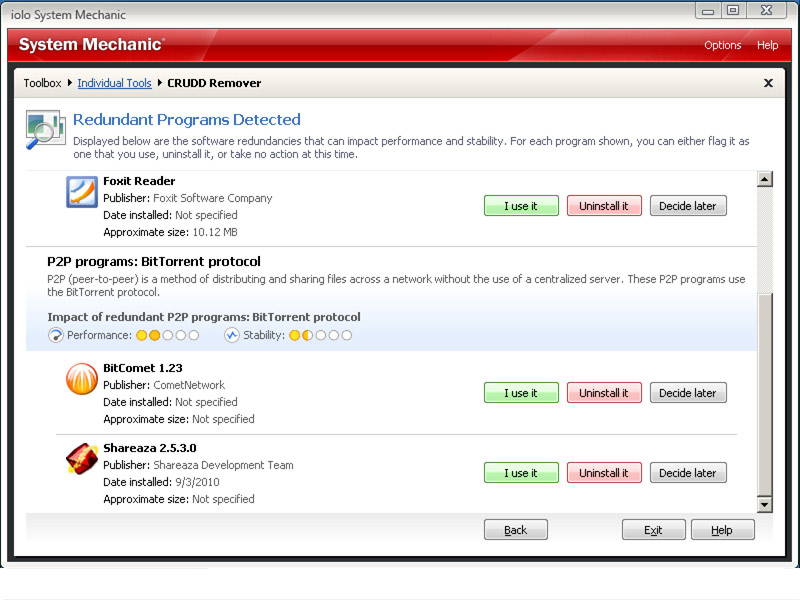 Commonly Redundant or Unnecessary Decelerators and Destabilizers (CRUDD) Remover™ helps identify and eliminate duplicate programs that overload your system. In addition to all the programs you install yourself, there’s the software that came with your PC that you may never use, as well as any number of programs that may have installed themselves on your computer without your knowledge. Now greatly enhanced to detect even more “Commonly Redundant or Unnecessary Decelerators and Destabilizers”, CRUDD Remover’s expert intelligence takes the hassle and guesswork out of finding, classifying, and presenting them all, so you can choose to remove unnecessary software bloat. |
ENHANCED: Windows 8.1 Certified
Every new operating system presents its own optimization challenges and Windows 8.1 is no exception. New System Mechanic has been specifically engineered to expand on the performance improvements in Windows 8.1 while at the same time eliminating issues it shares with earlier Windows versions all the way from Windows XP and Vista to Windows 7.
It has been fully designed to effectively fix, optimize, and maintain Windows 8.1 PCs based on extensive testing from iolo Labs. Some of the key areas of Windows 8 focus are:
- Startup Optimizer – Enhanced and engineered to leverage the already-improved start-up speeds of Windows 8.1 by removing unnecessary programs from start up. You not only start up faster, but PC response improves with less programs running in the background.
- Winspresso™ – Exclusive to Windows 8.1’s new tile interface, Winspresso is a new app that optimizes system memory by reclaiming RAM from background apps not in use. Easy access straight from a desktop tile makes it easy to give Windows a quick energy shot anytime you need it.
- PC Health Status App – Designed exclusively for the Windows 8.1 user interface, it lets you keep track of your system efficiency and health status at a glance.
ENHANCED: Tune-up Definitions™
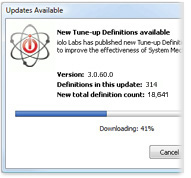 It’s the first technology of its kind and a critical part of System Mechanic’s automatic weekly intelligence updates. iolo Labs is continually studying and classifying new and changing threats to PC performance. Tune-up Definitions™ allow System Mechanic to individually tailor its diagnosis, repair, and optimization tools for each unique PC configuration, providing personalized solutions to emerging performance threats using ActiveCare technology. System Mechanic is now fueled by well over 36,000 independently identified solutions to common issues that arise from everyday use. This makes all the tools and functions that rely on this crucial data more effective than ever before. |
Guided Recommendations™
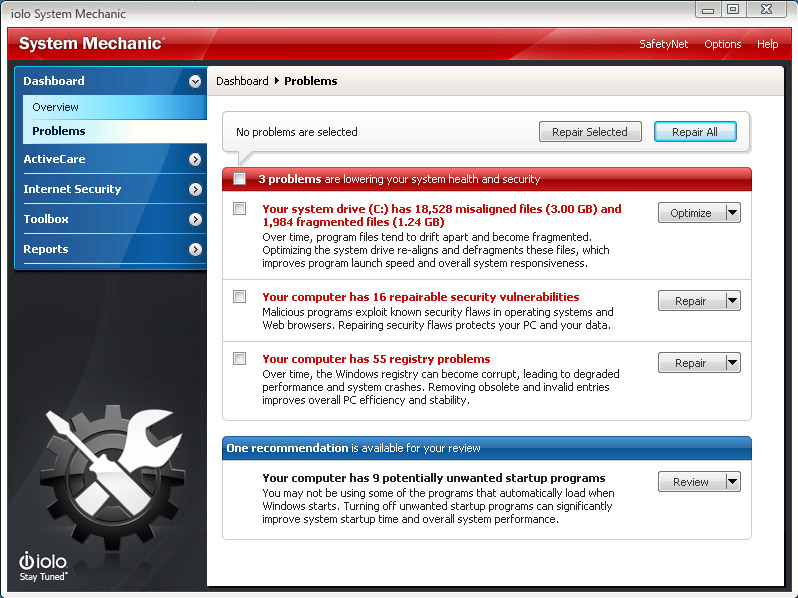 A seamless collaboration of 16 years of iolo’s breakthrough analytics, research, and professional experience, Guided Recommendations harnesses the collective intelligence of the entire System Mechanic community base so you can safely and easily take your PC to even greater heights of performance, even beyond what System Mechanic already performs automatically. Guided Recommendations fuses together three powerful technologies; Tune-up Definitions™, TrueImpact™ and the collective intelligence of the System Mechanic community to provide guidance on removing additional hidden programs that can bottleneck your PC performance. Because no two PCs are alike, each recommendation is tailored to your specific PC, providing insight into which potentially unwanted programs are typically disabled by the System Mechanic community. These collective recommendations, along with detailed descriptions and the impact measurement of each of these programs, gives you the power and to make at-a-glance decisions about how to make your computer faster and more efficient than ever before possible—all in just a few clicks. |
ENHANCED: AcceleWrite™
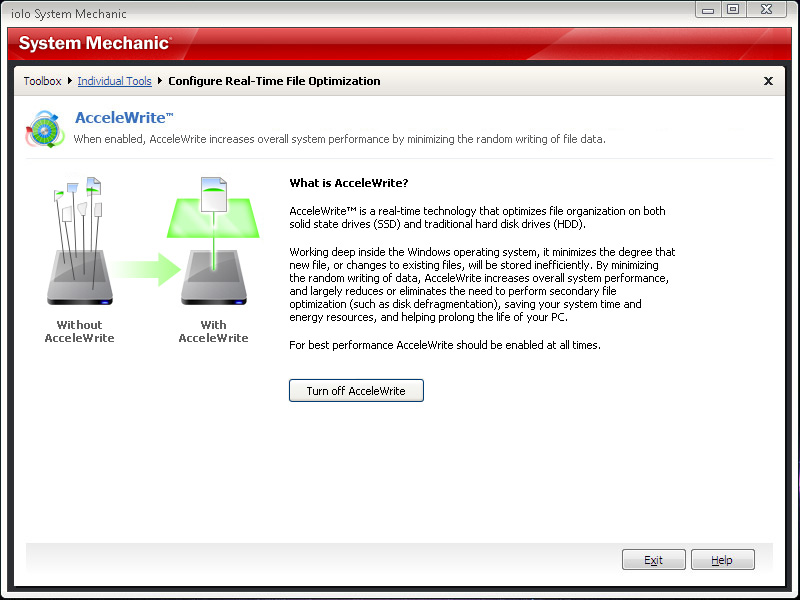 New real-time technology that optimizes file organization on both solid state drives (SSD) and traditional hard disk drives (HDD). Working deep inside the Windows operating system, it minimizes the degree that a new file, or changes to existing files, will be stored inefficiently. By minimizing the random writing of data, AcceleWrite increases overall system performance and largely reduces or eliminates the need to perform secondary file optimization (such as disk defragmentation), saving your system time and energy resources and helping prolong the life of your PC. |
Startup Optimizer™
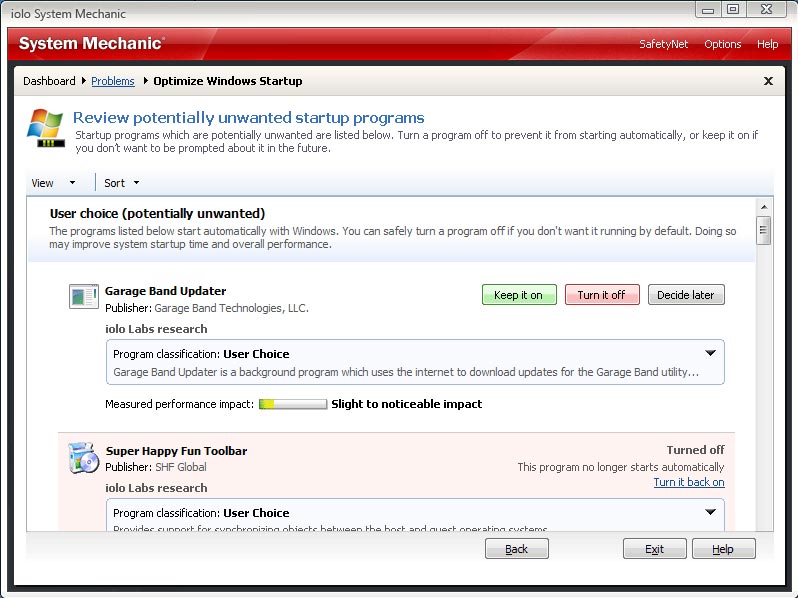 Start Windows significantly faster by eliminating unneeded or hazardous start up programs safely. Startup Optimizer is now expanded and even more simplified and delivers extra system horsepower at your command. Technology refinements now make it easier to achieve accelerated system startup speeds while precious resources are injected back into active programs and tasks throughout the day. New advancements coupled with ongoing research from iolo Labs and the collective intelligence of the entire System Mechanic community result in even broader startup coverage. Now it’s easier than ever to identify and root out unwanted programs that silently leach horsepower from startup and other high priority activities. |
Patented ActiveCare® Technology
(US Pat 7,873,877)
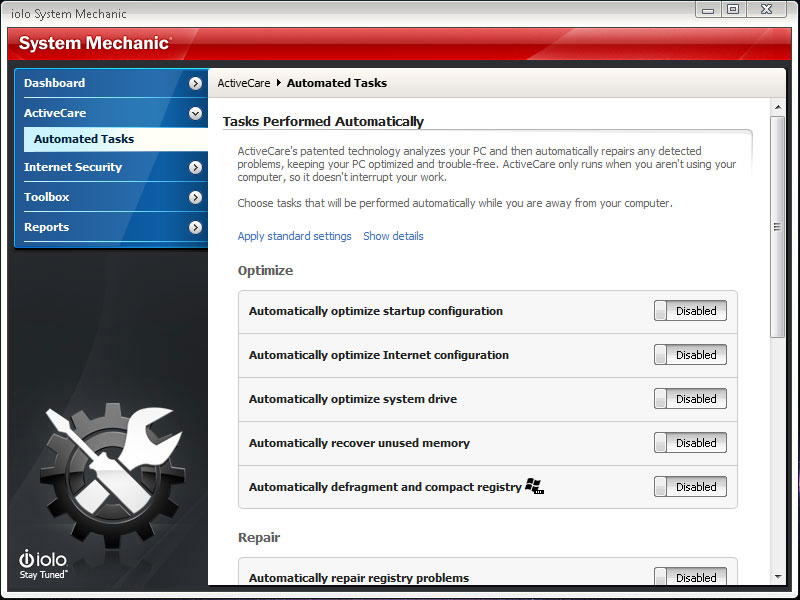 One of the many industry-first innovations included in System Mechanic, ActiveCare is now easier than ever to configure, with setup profiles that allow you to apply one-click maintenance options to your entire PC without the guesswork. System Mechanic’s exclusive idle-time optimization kicks in when your PC isn’t being used and releases full control when you return — so your system always stays ready for action. By silently tuning, fixing, and cleaning as needed while you’re away, you’ll have a faster and healthier PC without experiencing foreground maintenance activities that can bog things down. Other products blindly schedule maintenance at specific intervals whether they’re needed or not, and ignore operation-jamming problems that arise between scheduled events. Patented ActiveCare transparently and intelligently keeps your PC running optimally so your system always runs at peak performance levels. |
Designated Drivers™
 Keeps your PC running swiftly and stably by automatically installing critical driver updates. Device drivers are files filled with critical information that instruct your computer and the devices connected to it how to operate together effectively. All of the hardware on a PC—from the keyboard and mouse to the CPU and Wi-Fi adapter—require an up-to-date driver to keep them in good working order. Because they perform such essential tasks, keeping your drivers updated and in good working condition is central to ensuring your PC’s overall stability and performance. However, the process of manually updating drivers can be frustrating and time-consuming. Designated Drivers™–lets you update all of your PC’s drivers with just one click, now making driver updates a painless process. Designated Drivers is the only tool of its kind to exclusively use Microsoft-approved driver updates, which have gone through two rounds of quality assurance testing to ensure the updates are safe, reliable, and broadly compatible. |
SSD Accelerator™
 Streamlines, optimizes, and prolongs the life of modern solid-state drives, keeping them running at peak performance. Although solid state drives (SSDs) enjoy a significant speed advantage over traditional hard disk drives, it doesn’t mean they are impervious to slowdown or degradation over time. With regular, everyday use, many users have found that these drives begin to suffer from incremental performance loss. To resolve this problem, iolo’s engineers designed SSD Accelerator™ to proactively optimize solid state drives to keep them running at the peak of speed and efficiency. SSD Accelerator has also been designed to work together with System Mechanic’s other drive optimization tools such as AcceleWrite and ActiveCare technology in order to ensure that all of your data storage drives are automatically optimized for maximum performance and longevity on a regular basis. Note: The SSD Accelerator tool applies to Windows 7, Vista and XP. |
Program Accelerator™
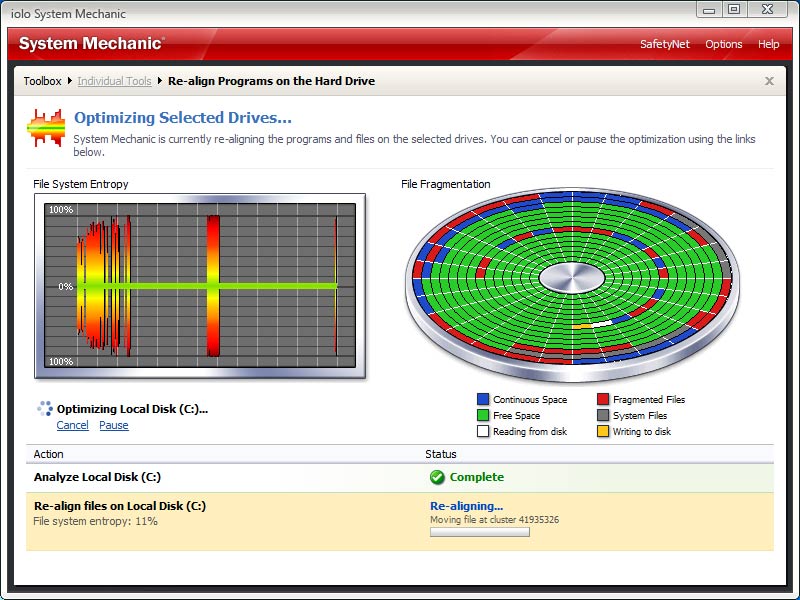 Speeds up overall program responsiveness by re-aligning all of a program’s dependent files on the hard drive. The problem: program misalignment can be a major cause of system slowdown created by errant Windows and software updates. It leads to progressively slower program launch and responsiveness as dependent files become scattered all over the hard drive. Disk defragmenters can make it worse, blindly compacting and separating related files even more. Program Accelerator’s unique patent-pending technology adds sophistication to enhance defrag tools, such as DriveAccelerator™, and move related files back together. Bottom line: Program Accelerator jump-starts your sluggish programs by fully re-aligning your whole PC file system. |
Unlimited PCs – Whole Home License®
 Many homes have multiple computers, and trying to keep track of the number of software license activations allowed across all machines can become complicated and frustrating, as well as costly. iolo decided to make things simpler: now iolo products include a Whole Home License® that lets you install on all your home PCs at no extra cost. Get more performance and more value with the first-ever software license that lets you use it on all your home PCs, no matter how many you have. |
Internet Connection Repair
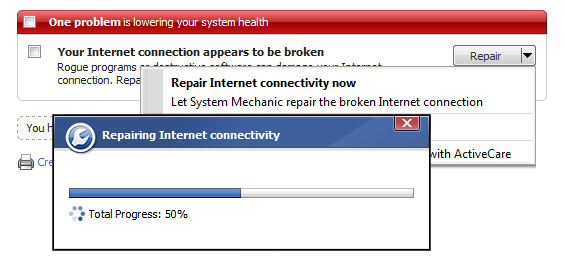 The frustration of being abruptly disconnected from the internet—usually right in the middle of something important—it happens even with broadband. System Mechanic’s new Internet Connection Repair technology detects bad connections and uses a regimen of proprietary technology to not only repair and reconnect your computer, but also help ensure the connection is as clean, fast, and reliable as possible. |
DriveAccelerator™
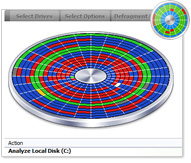
System Mechanic’s fast and powerful disk defrag tool is now engineered to work hand in hand with the patent-pending technology of Program Accelerator™ and AcceleWrite™ to completely optimize your hard drives and critical data for speed and reliability.
- Fully refreshed for even faster overall performance
- Redesigned to work in full concert with the new Program Accelerator™ and AcceleWrite®
- Uses ultra-secure double-data security techniques to fully safe-guard your important files
- Fully incorporates Windows SuperFetch updates resulting in even faster Windows startup
EnergyBooster™
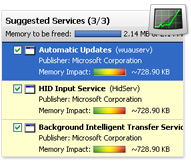 Boost speed by turning off unused background programs. Perfect for gamers, video and sound engineers, artists, web designers… or any serious computer user who requires an instant shot of raw, fast, focused performance. Frees up and maximizes system memory and CPU resources to give Windows additional horsepower. Uses iolo Labs’ Tune-up Definitions and user-defined profiles to identify background programs and services that can be temporarily shut down. |
Total Registry Revitalizer™
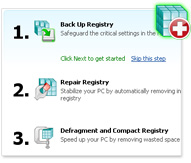 Repair, compact, defragment, and backup your Windows registry in one step. Integrates all of System Mechanic’s powerful registry tools to provide complete and seamless all-in-one care for the Windows registry, safely performing the entire battery of critical repair, maintenance, and optimization procedures in one step. This tool also leverages System Mechanic’s technology with more effective problem-detection, improved overall speed and efficiency of scans, and enhanced reporting that provides more detailed scope of errors. |
Incinerator® for Recycle Bin
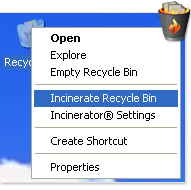 Permanently wipes files in the Windows Recycle Bin, so they can never be recovered. Incinerator® technology is now integrated into the Windows Recycle Bin, providing you with the choice of standard file deletion or the Department of Defense 5220-22M compliant technique for maximum security when emptying the Recycle Bin. |
System Mechanic Jump List
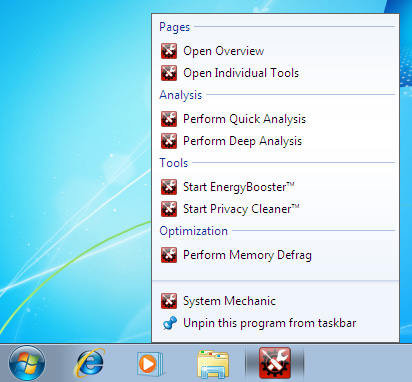 The System Mechanic Jump List gives you instant access to frequently needed information and features, such as system status, Memory Mechanic®, Energy Booster™, and more. The latest version allows you to launch a full scan and repair straight from your desktop. |
PC Health Status App
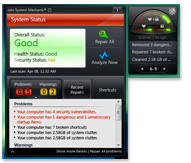 Designed exclusively for the Windows 8 tiled user interface, the PC Health Status App lets you keep track of your system efficiency and health status at a glance. For Windows 7 and Vista, the PC Health Status Gadget provides at-a-glance real-time reports on system health, security, and overall status, straight from your desktop. Both the app and gadget include a running list of recently performed repairs and optimizations, and offers quick access to commonly used tools, such as Memory Mechanic® and the new EnergyBooster™. |
Memory Mechanic®
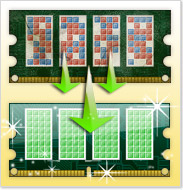 Instantly defragments RAM and liberates resources held captive by memory leaks. System Mechanic’s Memory Defragmentation tool is designed not only to reassemble your RAM into a neat, contiguous order for significant performance gains, but also to hunt down and release all of the resources held captive by memory leaks within sloppy programs. |
Privacy Cleaner™
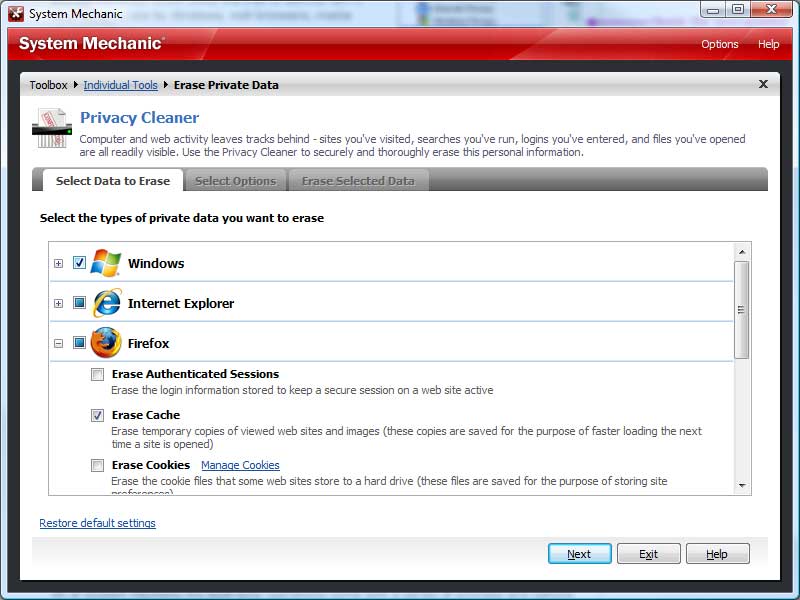 At your command, securely wipes away all traces of personal and confidential computer activity you specify. Better than simply clearing the cache, it uses military-grade Incinerator® data shredding technology to safely and permanently whisk away the trail of activity left in over 45 locations by Windows, web browsers, media players, and more. Now with dozens of additional cleanup targets including all major web browsers and chat clients: | |||
• Internet Explorer | • Firefox | • AIM | • MSN |
• Google Chrome | • Safari | • Yahoo! | • Skype |
• More… |
All-in-one PC Cleanup PowerTool™
All-in-One PC Cleanup has been greatly enhanced with additional junk file patterns, new ways of detecting and removing insidious system clutter, and improved scan speeds.
- Removes new file patterns exclusive to Windows 8, Windows 7, Vista, and XP
- Removes clutter from all major web browsers, including Internet Explorer, Firefox, Google Chrome, Safari, Opera
- Removes clutter from all major online chat programs, such as AIM, Skype, Yahoo!, MSN, and more
- Removes clutter from all major web toolbars, such as Google, Yahoo!, and more
Smarter Boot-Time Tune-ups
Some of the most important Windows system files such as the page file, the Registry hives, and the master file table, are locked by Windows and can never be defragmented using conventional defragmenting tools, but System Mechanic’s Boot-Time Defragmentation can defragment these special files conveniently before Windows loads. Now, all of System Mechanic’s boot-time operations come with a series of prompts and options that offer you increased control in order to avoid inopportune delays while starting up the PC. You can set up black-out times during the day where no boot-time tasks will be performed, and new prompts at PC startup give you the ability to run or postpone boot-time tasks at that time. |
Plus, hundreds of overall universal improvements for dramatically improved speed
A multitude of improvements, enhancements, stability augmentations and general fixes have been incorporated into this version for the most effective and reliable performance optimization product to date. |
