

Install ByePass in Microsoft Edge Chromium
NEW VERSION AVAILABLE: Migrate to ByePass+ to ensure continued service.
- In Microsoft Edge navigate to the ByePass activation page at https://www.iolo.com/cart/byepass/activation.aspx.
- Enter your email address and either your ByePass or System Mechanic Ultimate Defense Activation Key and click Submit.
NOTE: If you are installing as the free five account version, leave the activation key field blank. - Next click on Install ByePass.
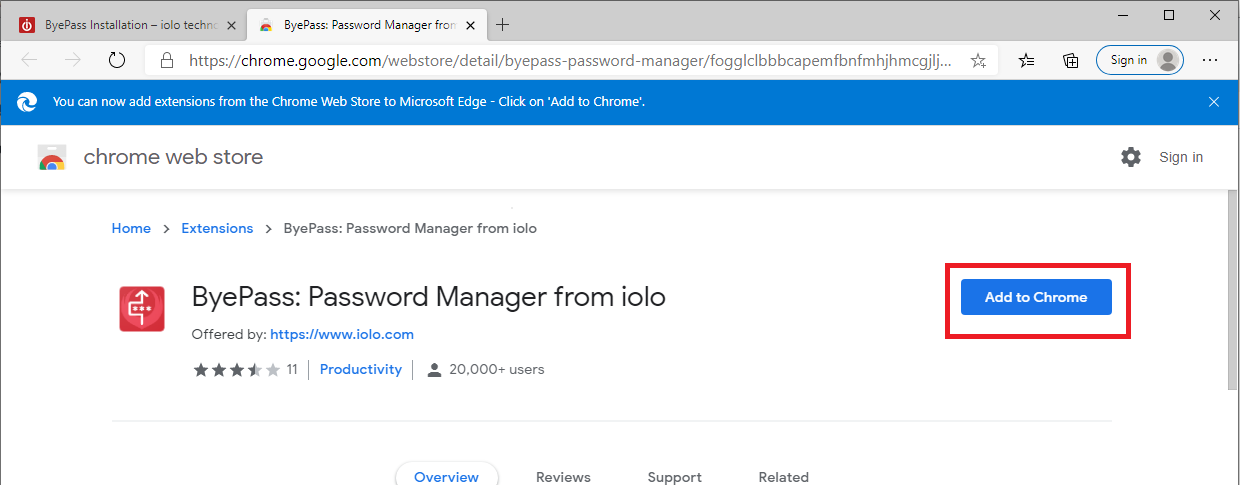
- When the web store page appears, click on Add to Chrome.
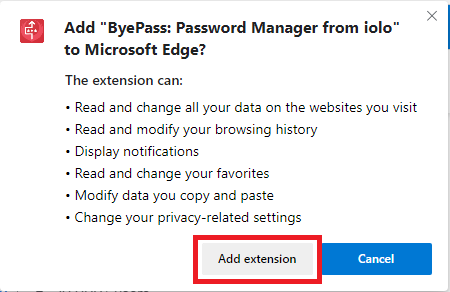
- Click on Add extension.
- ByePass will download and install. You can access it via the top upper-right corner or from the menu icon and then Extensions.
- Launch ByePass to get started.
Uninstalling ByePass from Microsoft Edge Chromium
To uninstall in Microsoft Edge, please follow the instructions below.
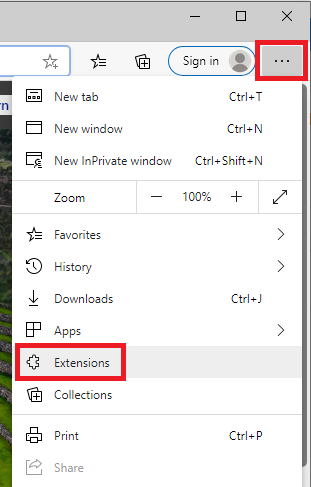
- To uninstall from Edge, click on the menu at the upper-right (...).
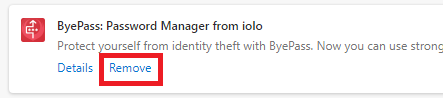
- Click Remove.
- Click on Extensions.
- Answer the survey (optional) and close the browser window.